> ## Documentation Index
> Fetch the complete documentation index at: https://docs.camel-ai.org/llms.txt
> Use this file to discover all available pages before exploring further.
# Track CAMEL Agents with AgentOps
You can also check this cookbook in colab [here](https://colab.research.google.com/drive/1z1-c0zYuErO7Zh2EATPyDSgrlkrxGTFR?usp=sharing)
⭐ Star us on [*Github*](https://github.com/camel-ai/camel), join our [*Discord*](https://discord.camel-ai.org) or follow our [*X*](https://x.com/camelaiorg)
*Goal: Track and analysis the running of CAMEL Single Agent and Multiple Agents including LLMs and Tools usage*
 ## 📦 Installation
First, install the CAMEL and AgentOps package with all its dependencies:
```python theme={"system"}
%pip install camel-ai[all]==0.2.16
%pip install agentops==0.3.10
```
## 🔑 Setting Up API Keys
```python theme={"system"}
import agentops
import os
from getpass import getpass
```
```python theme={"system"}
# Prompt for the OpenAI API key securely
openai_api_key = getpass('Enter your API key: ')
os.environ["OPENAI_API_KEY"] = openai_api_key
```
You can go to [here](https://app.agentops.ai/signin) to get **free** API Key from AgentOps
```python theme={"system"}
# Prompt for the AgentOps API key securely
agentops_api_key = getpass('Enter your API key:')
os.environ["AGENTOPS_API_KEY"] = agentops_api_key
```
Alternatively, if running on Colab, you could save your API keys and tokens as **Colab Secrets**, and use them across notebooks.
To do so, **comment out** the above **manual** API key prompt code block(s), and **uncomment** the following codeblock.
⚠️ Don't forget granting access to the API key you would be using to the current notebook.
```python theme={"system"}
# import os
# from google.colab import userdata
# os.environ["OPENAI_API_KEY"] = userdata.get("OPENAI_API_KEY")
# os.environ["AGENTOPS_API_KEY"] = userdata.get("AGENTOPS_API_KEY")
```
## 🤖 Run CAMEL Single Agent with Tool by using AgentOps to track the whole process!
Import required modules from CAMEL.
```python theme={"system"}
from camel.agents import ChatAgent
from camel.configs import ChatGPTConfig
from camel.messages import BaseMessage
from camel.models import ModelFactory
from camel.types import ModelPlatformType, ModelType
```
Initialize AgentOps, you need to import toolkits after init of agentops so that the tool usage would be tracked.
```python theme={"system"}
AGENTOPS_API_KEY = os.getenv("AGENTOPS_API_KEY")
agentops.init(AGENTOPS_API_KEY, default_tags=["CAMEL X AgentOps Single Agent with Tool Example"])
from camel.toolkits import SearchToolkit
```
Set one Agent with Search Tools
```python theme={"system"}
# Define system message
sys_msg = BaseMessage.make_assistant_message(
role_name='Tools calling opertor', content='You are a helpful assistant.'
)
# Set model config
tools = [*SearchToolkit().get_tools()]
model = ModelFactory.create(
model_platform=ModelPlatformType.OPENAI,
model_type=ModelType.GPT_4O_MINI,
)
# Set agent
camel_agent = ChatAgent(
system_message=sys_msg,
model=model,
tools=tools,
)
```
Set user query and run the agent
```python theme={"system"}
# Define a user message
usr_msg = 'What is CAMEL-AI.org?'
# Get response information
response = camel_agent.step(usr_msg)
print(response)
agentops.end_session("Success")
```
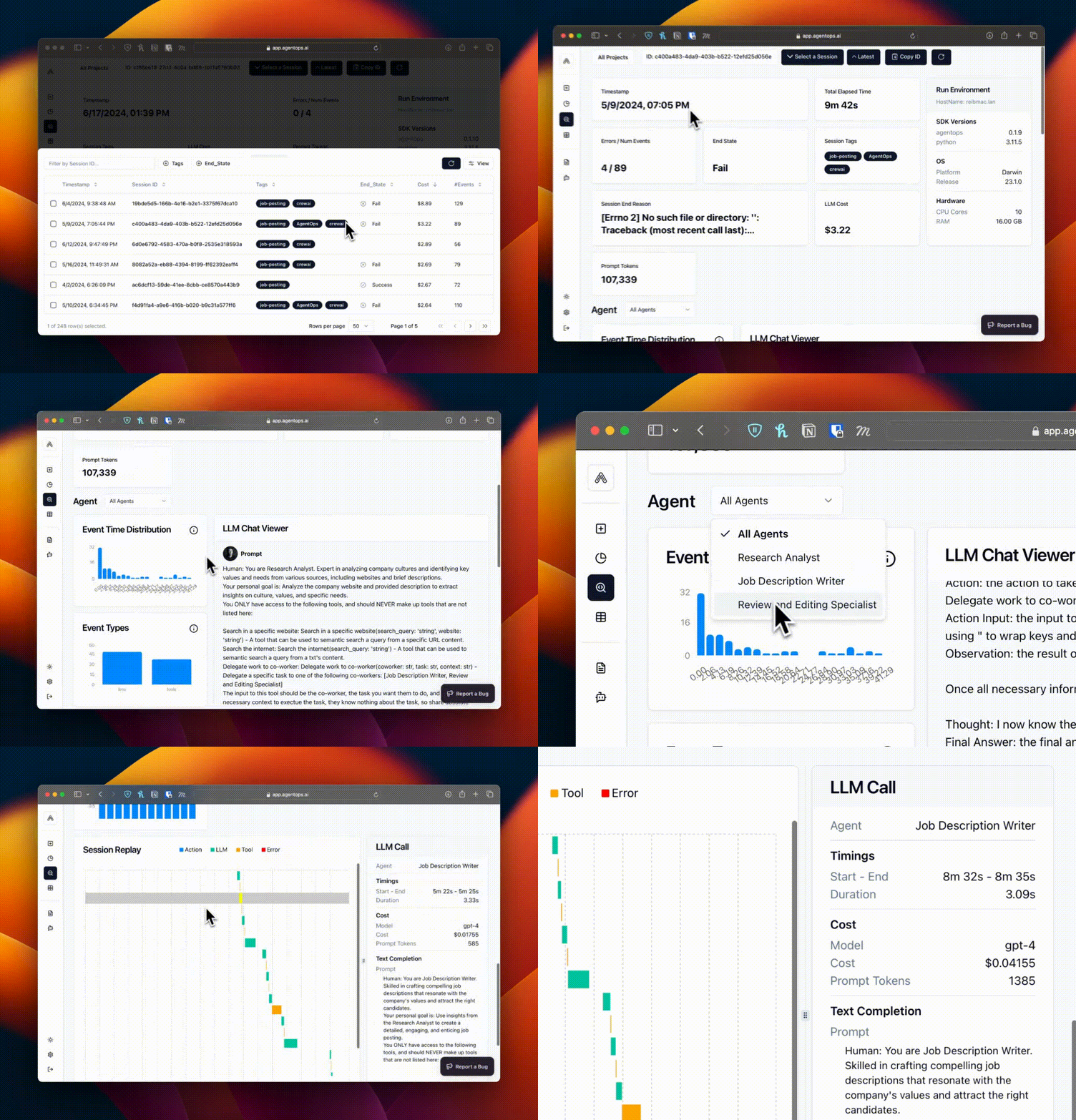
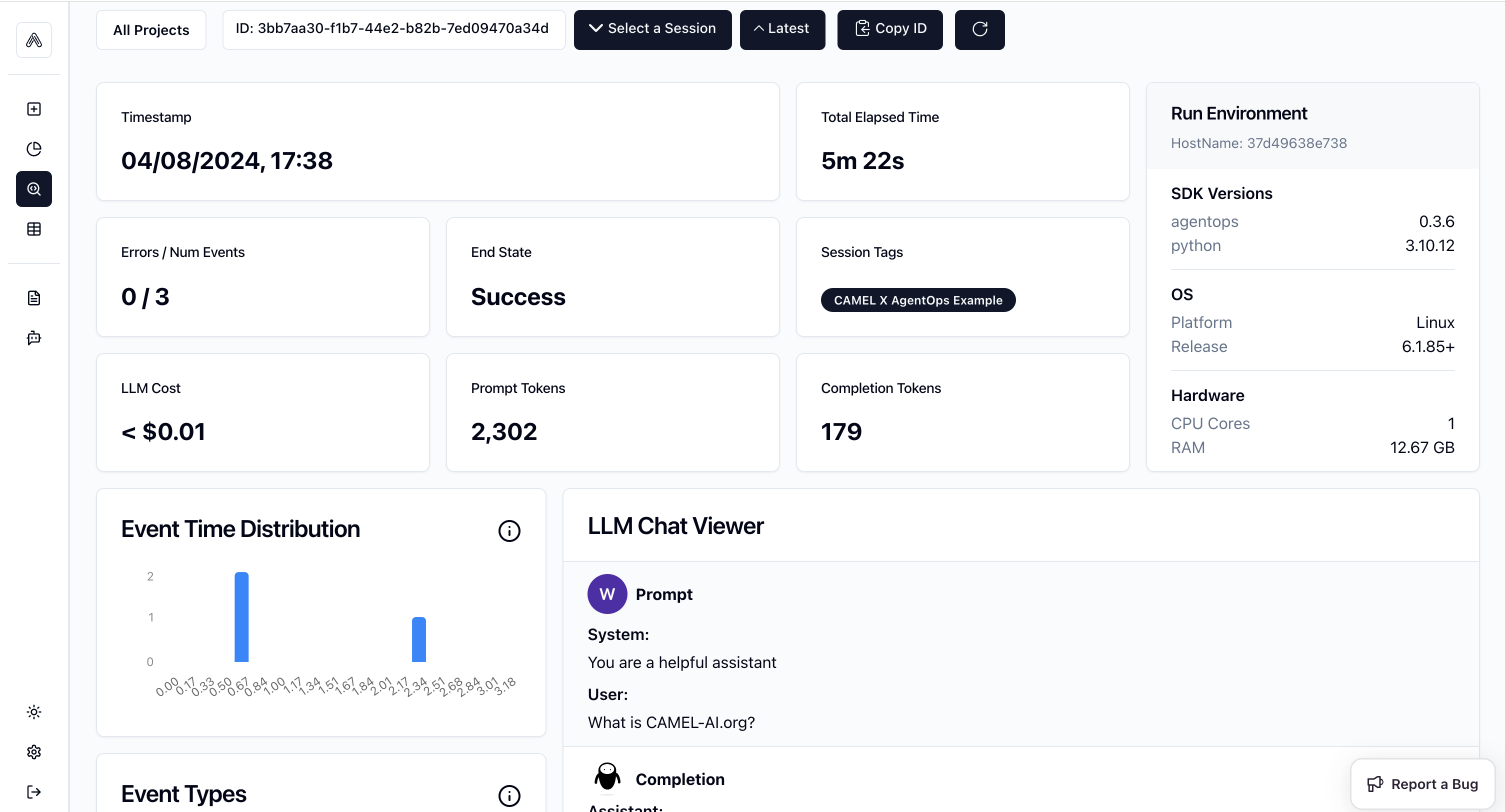
### 🎉 Go to the AgentOps link shown above, you will be able to see the detailed record for this running like below.
## 📦 Installation
First, install the CAMEL and AgentOps package with all its dependencies:
```python theme={"system"}
%pip install camel-ai[all]==0.2.16
%pip install agentops==0.3.10
```
## 🔑 Setting Up API Keys
```python theme={"system"}
import agentops
import os
from getpass import getpass
```
```python theme={"system"}
# Prompt for the OpenAI API key securely
openai_api_key = getpass('Enter your API key: ')
os.environ["OPENAI_API_KEY"] = openai_api_key
```
You can go to [here](https://app.agentops.ai/signin) to get **free** API Key from AgentOps
```python theme={"system"}
# Prompt for the AgentOps API key securely
agentops_api_key = getpass('Enter your API key:')
os.environ["AGENTOPS_API_KEY"] = agentops_api_key
```
Alternatively, if running on Colab, you could save your API keys and tokens as **Colab Secrets**, and use them across notebooks.
To do so, **comment out** the above **manual** API key prompt code block(s), and **uncomment** the following codeblock.
⚠️ Don't forget granting access to the API key you would be using to the current notebook.
```python theme={"system"}
# import os
# from google.colab import userdata
# os.environ["OPENAI_API_KEY"] = userdata.get("OPENAI_API_KEY")
# os.environ["AGENTOPS_API_KEY"] = userdata.get("AGENTOPS_API_KEY")
```
## 🤖 Run CAMEL Single Agent with Tool by using AgentOps to track the whole process!
Import required modules from CAMEL.
```python theme={"system"}
from camel.agents import ChatAgent
from camel.configs import ChatGPTConfig
from camel.messages import BaseMessage
from camel.models import ModelFactory
from camel.types import ModelPlatformType, ModelType
```
Initialize AgentOps, you need to import toolkits after init of agentops so that the tool usage would be tracked.
```python theme={"system"}
AGENTOPS_API_KEY = os.getenv("AGENTOPS_API_KEY")
agentops.init(AGENTOPS_API_KEY, default_tags=["CAMEL X AgentOps Single Agent with Tool Example"])
from camel.toolkits import SearchToolkit
```
Set one Agent with Search Tools
```python theme={"system"}
# Define system message
sys_msg = BaseMessage.make_assistant_message(
role_name='Tools calling opertor', content='You are a helpful assistant.'
)
# Set model config
tools = [*SearchToolkit().get_tools()]
model = ModelFactory.create(
model_platform=ModelPlatformType.OPENAI,
model_type=ModelType.GPT_4O_MINI,
)
# Set agent
camel_agent = ChatAgent(
system_message=sys_msg,
model=model,
tools=tools,
)
```
Set user query and run the agent
```python theme={"system"}
# Define a user message
usr_msg = 'What is CAMEL-AI.org?'
# Get response information
response = camel_agent.step(usr_msg)
print(response)
agentops.end_session("Success")
```
### 🎉 Go to the AgentOps link shown above, you will be able to see the detailed record for this running like below.
 ## 🤖🤖 Run CAMEL Multi-agent with Tool by using AgentOps to track the whole process!
Import required modules
```python theme={"system"}
from typing import List
from colorama import Fore
from camel.agents.chat_agent import FunctionCallingRecord
from camel.configs import ChatGPTConfig
from camel.models import ModelFactory
from camel.societies import RolePlaying
from camel.types import ModelPlatformType, ModelType
from camel.utils import print_text_animated
import agentops
```
Initialize AgentOps, you need to import toolkits after init of agentops so that the tool usage would be tracked.
```python theme={"system"}
agentops.start_session(tags=["CAMEL X AgentOps Multi-agent with Tools."])
from camel.toolkits import (
SearchToolkit,
MathToolkit,
)
```
Set your task prompt
```python theme={"system"}
task_prompt = (
"Assume now is 2024 in the Gregorian calendar, "
"estimate the current age of University of Oxford "
"and then add 10 more years to this age, "
"and get the current weather of the city where "
"the University is located."
)
```
Set tools for the assistant agent, we wish the agent would be able to do mathmatic calculation and search information from websites
```python theme={"system"}
tools = [
*MathToolkit().get_tools(),
*SearchToolkit().get_tools(),
]
```
Set up Role Playing session
```python theme={"system"}
role_play_session = RolePlaying(
assistant_role_name="Searcher",
user_role_name="Professor",
assistant_agent_kwargs=dict(
model=ModelFactory.create(
model_platform=ModelPlatformType.OPENAI,
model_type=ModelType.GPT_4O_MINI,
),
tools=tools,
),
user_agent_kwargs=dict(
model=ModelFactory.create(
model_platform=ModelPlatformType.OPENAI,
model_type=ModelType.GPT_4O_MINI,
),
),
task_prompt=task_prompt,
with_task_specify=False,
)
```
Print the system message and task prompt
```python theme={"system"}
print(
Fore.GREEN
+ f"AI Assistant sys message:\n{role_play_session.assistant_sys_msg}\n"
)
print(Fore.BLUE + f"AI User sys message:\n{role_play_session.user_sys_msg}\n")
print(Fore.YELLOW + f"Original task prompt:\n{task_prompt}\n")
print(
Fore.CYAN
+ "Specified task prompt:"
+ f"\n{role_play_session.specified_task_prompt}\n"
)
print(Fore.RED + f"Final task prompt:\n{role_play_session.task_prompt}\n")
```
Set terminate rule and print the chat message
```python theme={"system"}
n = 0
input_msg = role_play_session.init_chat()
while n < 50:
n += 1
assistant_response, user_response = role_play_session.step(input_msg)
if assistant_response.terminated:
print(
Fore.GREEN
+ (
"AI Assistant terminated. Reason: "
f"{assistant_response.info['termination_reasons']}."
)
)
break
if user_response.terminated:
print(
Fore.GREEN
+ (
"AI User terminated. "
f"Reason: {user_response.info['termination_reasons']}."
)
)
break
# Print output from the user
print_text_animated(
Fore.BLUE + f"AI User:\n\n{user_response.msg.content}\n"
)
# Print output from the assistant, including any function
# execution information
print_text_animated(Fore.GREEN + "AI Assistant:")
tool_calls: List[FunctionCallingRecord] = assistant_response.info[
'tool_calls'
]
for func_record in tool_calls:
print_text_animated(f"{func_record}")
print_text_animated(f"{assistant_response.msg.content}\n")
if "CAMEL_TASK_DONE" in user_response.msg.content:
break
input_msg = assistant_response.msg
```
End the AgentOps session
```python theme={"system"}
agentops.end_session("Success")
```
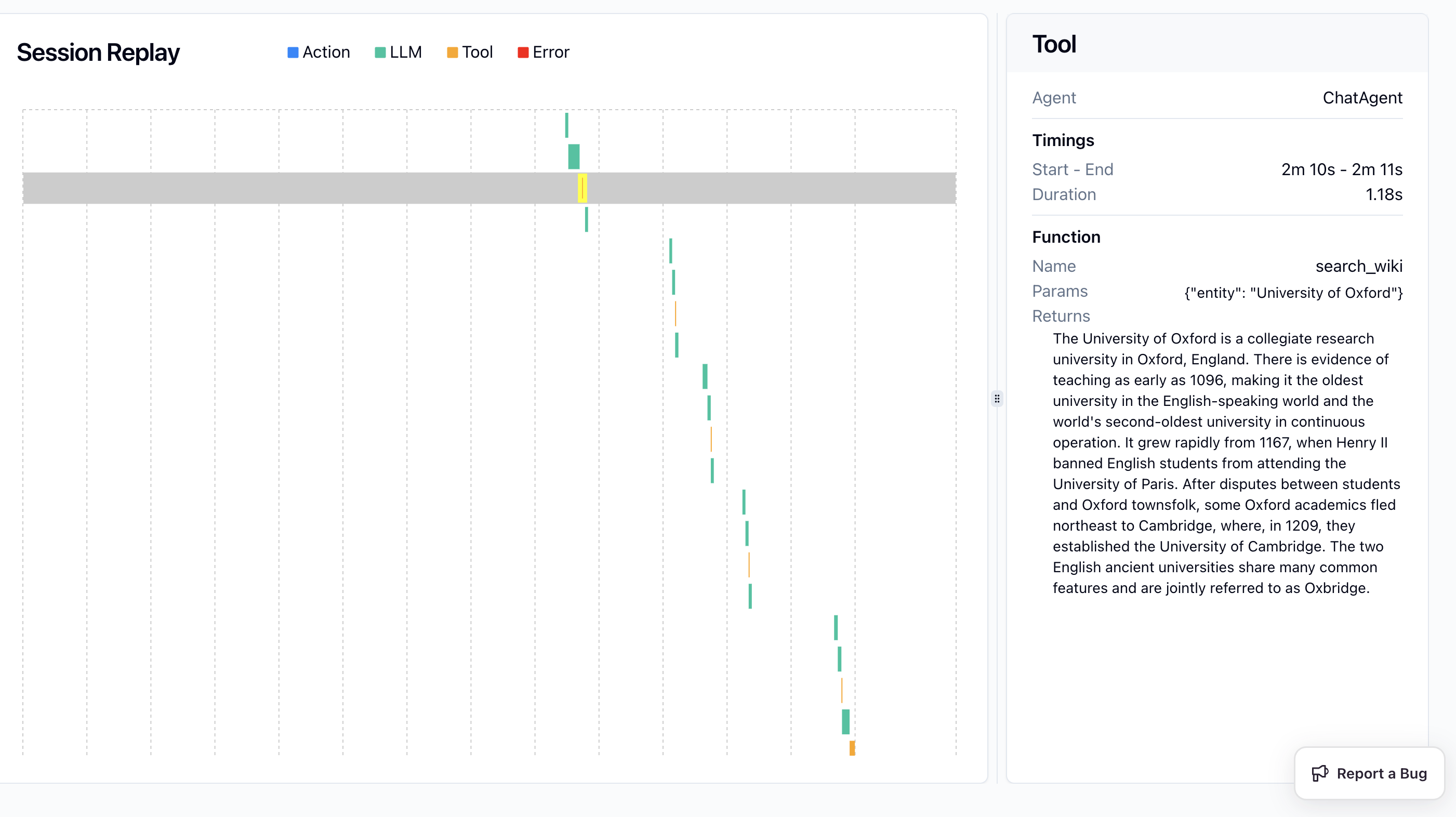
### 🎉 Go to the AgentOps link shown above, you will be able to see the detailed record for the multi-agent running like below.
## 🤖🤖 Run CAMEL Multi-agent with Tool by using AgentOps to track the whole process!
Import required modules
```python theme={"system"}
from typing import List
from colorama import Fore
from camel.agents.chat_agent import FunctionCallingRecord
from camel.configs import ChatGPTConfig
from camel.models import ModelFactory
from camel.societies import RolePlaying
from camel.types import ModelPlatformType, ModelType
from camel.utils import print_text_animated
import agentops
```
Initialize AgentOps, you need to import toolkits after init of agentops so that the tool usage would be tracked.
```python theme={"system"}
agentops.start_session(tags=["CAMEL X AgentOps Multi-agent with Tools."])
from camel.toolkits import (
SearchToolkit,
MathToolkit,
)
```
Set your task prompt
```python theme={"system"}
task_prompt = (
"Assume now is 2024 in the Gregorian calendar, "
"estimate the current age of University of Oxford "
"and then add 10 more years to this age, "
"and get the current weather of the city where "
"the University is located."
)
```
Set tools for the assistant agent, we wish the agent would be able to do mathmatic calculation and search information from websites
```python theme={"system"}
tools = [
*MathToolkit().get_tools(),
*SearchToolkit().get_tools(),
]
```
Set up Role Playing session
```python theme={"system"}
role_play_session = RolePlaying(
assistant_role_name="Searcher",
user_role_name="Professor",
assistant_agent_kwargs=dict(
model=ModelFactory.create(
model_platform=ModelPlatformType.OPENAI,
model_type=ModelType.GPT_4O_MINI,
),
tools=tools,
),
user_agent_kwargs=dict(
model=ModelFactory.create(
model_platform=ModelPlatformType.OPENAI,
model_type=ModelType.GPT_4O_MINI,
),
),
task_prompt=task_prompt,
with_task_specify=False,
)
```
Print the system message and task prompt
```python theme={"system"}
print(
Fore.GREEN
+ f"AI Assistant sys message:\n{role_play_session.assistant_sys_msg}\n"
)
print(Fore.BLUE + f"AI User sys message:\n{role_play_session.user_sys_msg}\n")
print(Fore.YELLOW + f"Original task prompt:\n{task_prompt}\n")
print(
Fore.CYAN
+ "Specified task prompt:"
+ f"\n{role_play_session.specified_task_prompt}\n"
)
print(Fore.RED + f"Final task prompt:\n{role_play_session.task_prompt}\n")
```
Set terminate rule and print the chat message
```python theme={"system"}
n = 0
input_msg = role_play_session.init_chat()
while n < 50:
n += 1
assistant_response, user_response = role_play_session.step(input_msg)
if assistant_response.terminated:
print(
Fore.GREEN
+ (
"AI Assistant terminated. Reason: "
f"{assistant_response.info['termination_reasons']}."
)
)
break
if user_response.terminated:
print(
Fore.GREEN
+ (
"AI User terminated. "
f"Reason: {user_response.info['termination_reasons']}."
)
)
break
# Print output from the user
print_text_animated(
Fore.BLUE + f"AI User:\n\n{user_response.msg.content}\n"
)
# Print output from the assistant, including any function
# execution information
print_text_animated(Fore.GREEN + "AI Assistant:")
tool_calls: List[FunctionCallingRecord] = assistant_response.info[
'tool_calls'
]
for func_record in tool_calls:
print_text_animated(f"{func_record}")
print_text_animated(f"{assistant_response.msg.content}\n")
if "CAMEL_TASK_DONE" in user_response.msg.content:
break
input_msg = assistant_response.msg
```
End the AgentOps session
```python theme={"system"}
agentops.end_session("Success")
```
### 🎉 Go to the AgentOps link shown above, you will be able to see the detailed record for the multi-agent running like below.