> ## Documentation Index
> Fetch the complete documentation index at: https://docs.camel-ai.org/llms.txt
> Use this file to discover all available pages before exploring further.
# Overview
> Introduction to MCP: what it is, why it matters, and how it transforms agent integration.
## What is MCP all about?
MCP (Model Context Protocol) originated from an [Anthropic article](https://www.anthropic.com/news/model-context-protocol) published on November 25, 2024: *Introducing the Model Context Protocol*.
MCP defines **how applications and AI models exchange contextual information**.
It enables developers to connect data sources, tools, and functions to LLMs using a universal, standardized protocol—much like USB-C enables diverse devices to connect via a single interface.
MCP aims to be the "USB-C for AI": one protocol, endless integrations. Plug in any tool or data source—LLM models just work with it.
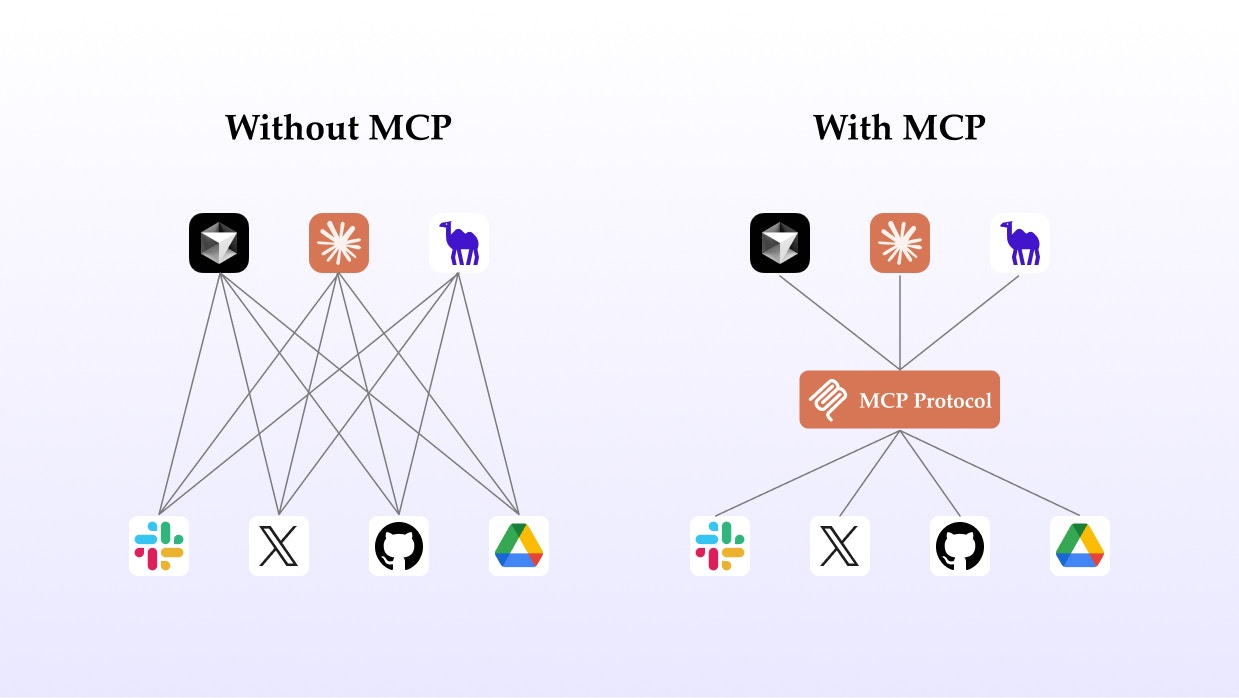
Sits between LLMs and external tools/data, so you can add capabilities and context without changing agent code.
MCP servers can be built in any language, run anywhere, and connect to anything—from cloud APIs to local files.
Write your agent logic once, then extend it with new plugins or data via MCP, just by registering a new server.
## Visualizing MCP
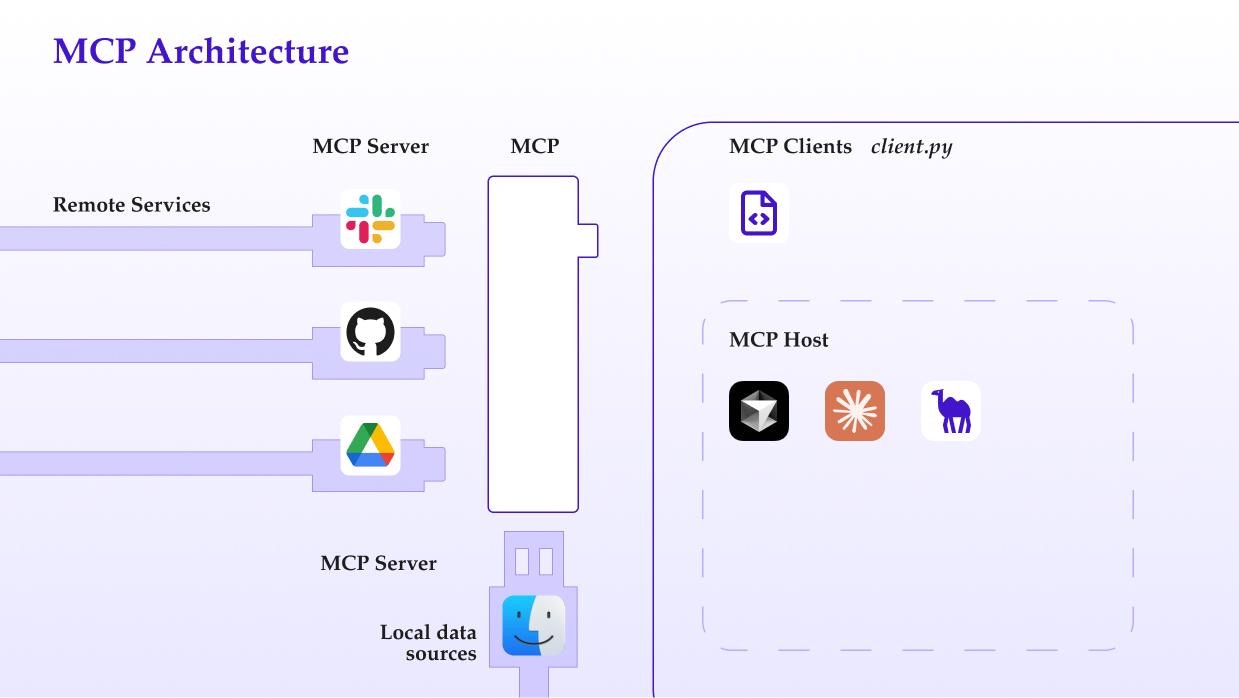
Here’s how MCP acts as an **intermediate protocol layer** between LLMs and tools:
 ## What Changes with MCP?
 ## Why introduce MCP?
* **Ecosystem**: Leverage a growing library of MCP plugins—just plug them in.
* **Uniformity**: Not limited to any one model or vendor; if your agent supports MCP, you can swap models/tools anytime.
* **Data Security**: Keep sensitive data on your device. MCP servers decide what to expose—your private data never needs to leave your machine.
## MCP Architecture and Principles
**Basic Architecture**
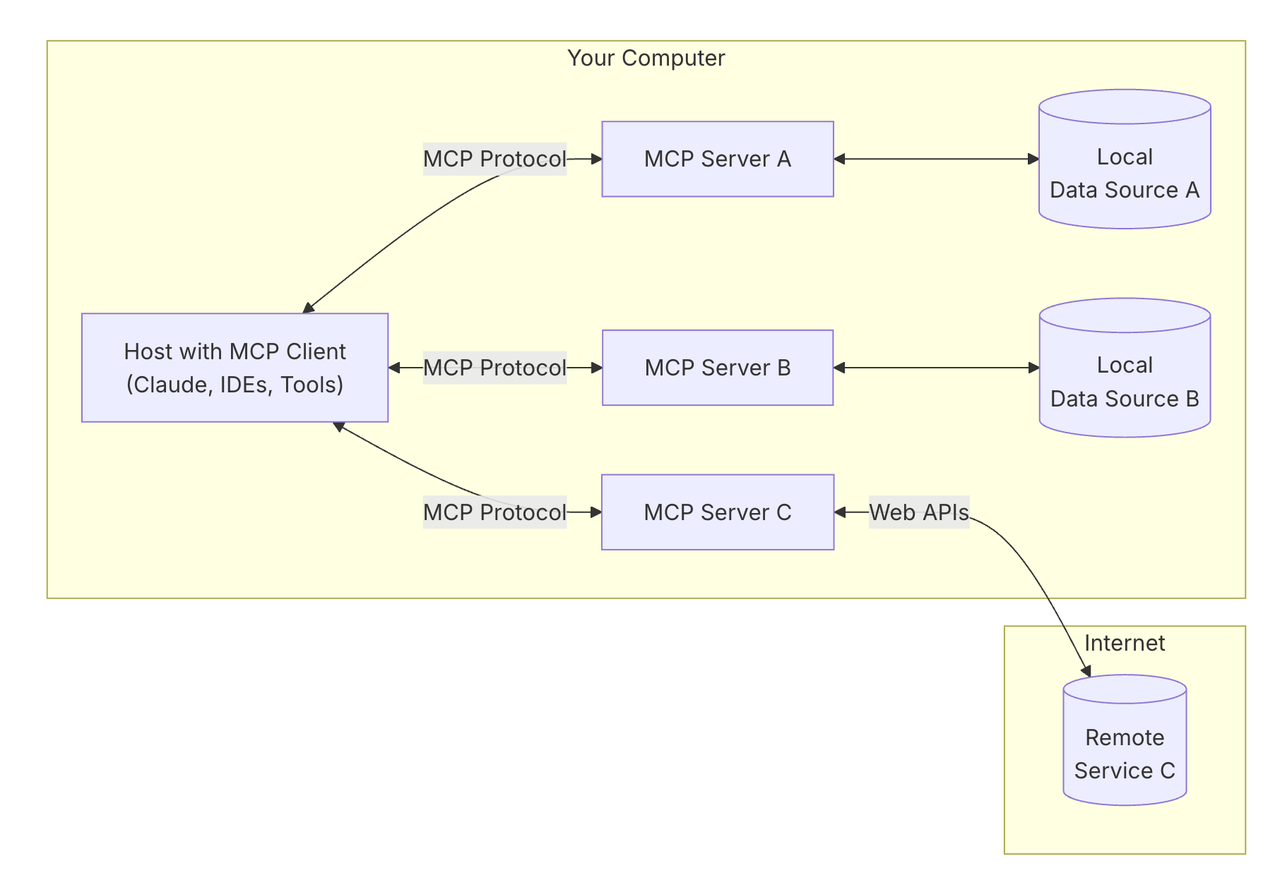
MCP follows a **client-server model** with three main roles:
Applications like Claude Desktop, IDEs, or AI tools that need external data/tools. The "Host" is the user-facing app.
Built into the Host, the MCP Client manages protocol communication and connects to MCP Servers.
Lightweight services (local or remote) that expose specific functions (e.g., read files, search web) via the MCP protocol.
* **Local Data Sources**: Files, folders, databases, and services MCP servers can securely access.
* **Remote Services**: Online APIs and cloud platforms accessible to MCP servers.
## Why introduce MCP?
* **Ecosystem**: Leverage a growing library of MCP plugins—just plug them in.
* **Uniformity**: Not limited to any one model or vendor; if your agent supports MCP, you can swap models/tools anytime.
* **Data Security**: Keep sensitive data on your device. MCP servers decide what to expose—your private data never needs to leave your machine.
## MCP Architecture and Principles
**Basic Architecture**
MCP follows a **client-server model** with three main roles:
Applications like Claude Desktop, IDEs, or AI tools that need external data/tools. The "Host" is the user-facing app.
Built into the Host, the MCP Client manages protocol communication and connects to MCP Servers.
Lightweight services (local or remote) that expose specific functions (e.g., read files, search web) via the MCP protocol.
* **Local Data Sources**: Files, folders, databases, and services MCP servers can securely access.
* **Remote Services**: Online APIs and cloud platforms accessible to MCP servers.
 ### How it works, step by step:
1. **User asks:**
“What documents do I have on my desktop?” via the Host (e.g., Claude Desktop).
2. **Host (MCP Host):**
Receives your question and forwards it to the Claude model.
3. **Client (MCP Client):**
Claude model decides it needs more data, Client is activated to connect to a file system MCP Server.
4. **Server (MCP Server):**
The server reads your desktop directory and returns a list of documents.
5. **Results:**
Claude uses this info to answer your question, displayed in your desktop app.
This architecture **lets agents dynamically call tools and access data**—local or remote—while developers only focus on building the relevant MCPServer.
**You don’t have to handle the nitty-gritty of connecting Hosts and Clients.**
For deeper architecture details and diagrams, see the
official MCP docs: Architecture Concepts.
## At a Glance
* **MCP** standardizes and simplifies agent-to-tool connections.
* **Developers** build or reuse MCP servers, not custom integrations for every agent.
* **Users** get safer, more flexible, and privacy-friendly AI workflows.
***
### How it works, step by step:
1. **User asks:**
“What documents do I have on my desktop?” via the Host (e.g., Claude Desktop).
2. **Host (MCP Host):**
Receives your question and forwards it to the Claude model.
3. **Client (MCP Client):**
Claude model decides it needs more data, Client is activated to connect to a file system MCP Server.
4. **Server (MCP Server):**
The server reads your desktop directory and returns a list of documents.
5. **Results:**
Claude uses this info to answer your question, displayed in your desktop app.
This architecture **lets agents dynamically call tools and access data**—local or remote—while developers only focus on building the relevant MCPServer.
**You don’t have to handle the nitty-gritty of connecting Hosts and Clients.**
For deeper architecture details and diagrams, see the
official MCP docs: Architecture Concepts.
## At a Glance
* **MCP** standardizes and simplifies agent-to-tool connections.
* **Developers** build or reuse MCP servers, not custom integrations for every agent.
* **Users** get safer, more flexible, and privacy-friendly AI workflows.
***